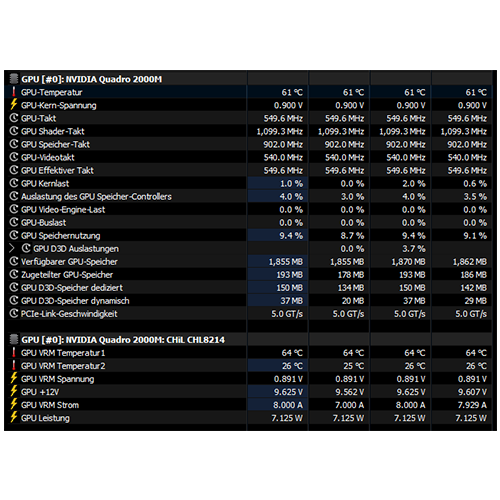
After successfully installing the drivers, I first installed Unigine Heaven (a DirectX 11 benchmark) to see if the 3D acceleration really runs smoothly and also how the power-hungry 55-watt TDP card performs in the relatively small 15.6″ EliteBook 8540p. As always, I monitored everything with HWiNFO64.
First surprise:
The Quadro 2000M reveals a lot more than the NVS 5100M did, namely very interesting VRM values such as temperatures and current/voltage values:

After Heaven had been running for a few hours without any problems and I noticed that I still had about 10-15 °C of thermal headroom before it would become critical, the question naturally arose…
…if the NVS 5100M could be overclocked so easily and significantly with MSI Afterburner, can the Quadro 2000M do the same?
The answer is yes – and the performance boost is nothing short of incredible.
But first, testing is carried out using original clock speeds.
First verify test values, with obstacles:
To maintain consistency with PassMark scores for comparison purposes, I installed and ran Performance Test v11.1 on Windows 10.
The result was only 711 points with original clock speeds (550/900 MHz) – significantly less than previously listed in the technical.city table (this could be due to many factors, such as Windows, drivers, CPU performance, background processes, daily mood, etc.).
It should have been 765 points, but with 711, it is now 7% fewer points.
At first, I suspected that the CPU was not powerful enough or that background processes were preventing the boost to 3.20 GHz on one core from being achieved consistently, meaning that it could not feed the GPU well enough.
Then I thought that it could at least partly be the “penalty” that this benchmark imposes because it cannot run the intended resolution (Full HD, but the panel built into our 8540p can “only” run HD+, i.e., 1600 x 900). This “penalty” is appropriately 7%, so that could well be it.
I verified this by connecting an external monitor via VGA (I had the cable to hand, DP would also have worked) and lo and behold – now I have 740 points. Still not quite there, but better. Only a 3.3% difference, so I left it at that.
Of course, at higher resolutions, the load is increasingly shifted towards the GPU, which in this case could reveal a very slight CPU bottleneck.
Now it’s time to overclock!
After a few hours with MSI Afterburner (slowly increasing the clock speeds one after the other and repeatedly testing with Heaven) and HWiNFO for monitoring, I reached the maximum overclock, almost at the limit—I had to reduce the VRAM clock speed slightly because one of the two cards started to show artifacts.
Since the original NVS 5100M was presumably suffering from dying VRAM components, it’s probably a good idea to go a little easier this time, regardless of stability.
Of course, I wonder what clock speeds would be possible on the GPU core if MSI Afterburner didn’t limit it (I suspect that the real limit, as is always the case, comes from Nvidia’s VBIOS, which is located on the card).
In the subsequent rerun of the PassMark Performance Test on the external Full HD screen, the result was a smooth 1100 points – a whopping 49.1% increase in points!
I am very satisfied with the results achieved; the Quadro 2000M runs much better than expected!
It was definitely worth it – of course, the card now reaches 95°C under prolonged full load, whereas previously it was more in the range of 80–85°C. The VRMs then exceed 100°C significantly, sometimes reaching 115°C or more.
In our case, I can live with that, since the GPU will never be under extreme stress for very long, as in a benchmark. It’s better to have performance reserves that you rarely need than to constantly run at the limit.
Here are the overclocking changes in tabular form:
| Original | Both new cards | |
|---|---|---|
| Core clock | 550 MHz | 715 MHz |
| Core clock difference | – | + 30 % |
| Resulting shader clock speed | 1100 MHz | 1430 MHz |
| Shader clock difference | – | + 30 % |
| VRAM clock | 900 MHz 1800 MHz effective | 1150 MHz 2300 MHz effective |
| VRAM difference | – | + 27,78 % |
So, looking at the entire process, these were the increases:
Original GPU, Nvidia NVS 5100M with 1 GB VRAM:
199 PassMark points – that was the baseline.
100% performance
Overclocking to the limit of the Nvidia NVS 5100M with 1 GB VRAM:
240 PassMark points (the stronger of the two)
121% performance
Conversion to Nvidia Quadro 2000M with 2 GB VRAM:
740 PassMark points
371% performance
Overclocking to the limit of the Nvidia Quadro 2000M with 2 GB VRAM:
1100 PassMark points
552% performance!
So the whole operation more than quintupled the original graphics performance of our 8540p and improved a few other things as well (DirectX 11, WDDM, 2 GB VRAM)!
Brief explanation of overclocking graphics cards:
I hope that I have been able to provide some general insights into overclocking (Nvidia) graphics chips. The whole process works in the same way with all Nvidia graphics chips that allow overclocking – you can find this out by installing and launching Afterburner. If everything is grayed out, overclocking is not possible.
Up to and including the Maxwell architecture (GT/GTX 9xx series), you could even freely edit the VBIOS limitations by flashing a modified VBIOS onto the card, which would then remove or extend the limits in Afterburner.
Of course, this is more dangerous than doing it with running software like Afterburner, but it allowed you to do cool things like writing the overclock directly into the VBIOS and thus being able to use it under Linux / Macintosh without special software – or simply passing on “pre-overclocked GPUs” that anyone can use without special knowledge.
Increasing or removing thermal and/or performance and/or voltage limits, programming other VRAM modules, flashing them, then desoldering the existing ones and installing larger ones – all of this is possible. It’s pretty cool.
Or undervolting and underclocking to optimize efficiency, which is also very useful, especially with limited cooling options – but that’s a science in itself and a topic for another post.
The topic of GPUs is now complete, so let’s move on to other hardware changes I’ve made.