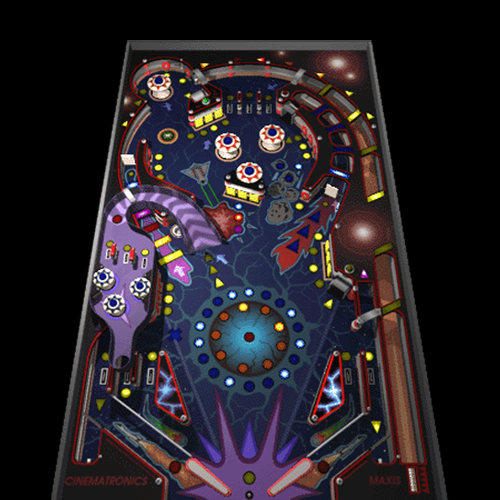
I wonder how many hours people spent playing this simple yet incredibly fun pinball classic from Cinematronics / Maxis back in the Windows XP days?
But let’s start from the beginning – this stripped-down pinball game has a history:
Originally, Space Cadet was just one of three tables in the full-fledged game “Full Tilt! Pinball (1995)” by the American developer Cinematronics, which was acquired by Maxis shortly thereafter. Maxis is best known today for “The Sims” and “SimCity” and was acquired by Electronic Arts as early as 1997.
How did Space Cadet end up in Windows?
First and foremost, this version – which was limited to a single table and otherwise technically stripped-down – appeared on the market as part of the “Windows 95 Plus!” bundle, just as we still know it today. Later, it was re-licensed by Microsoft and included with Windows ME, NT 4.0, 2000 and XP. Personally, I remember it as one of several games included in Windows XP.
Since then, this game has not been included in subsequent versions of Windows – which is a shame, i liked it.
Does it run on modern Windows?
Yes, the game still runs unchanged today on the original systems as well as on Windows Vista, 7, 8, 8.1, 10, and 11 – on both 32-bit and 64-bit versions of the operating system. A port to SDL has also been implemented, so since 2020 you can play this game on many platforms or even in a browser!
You can download the game for example from archive.org in various languages; the “WaveFiles” must also be downloaded separately to get the sound effects. Or you can simply copy the entire game folder from a Windows XP installation to a newer version of Windows, that works too.
Here is the overview page on archive.org: 3D Pinball: Space Cadet (EN/DEU/PL/CS/JP/DA)
Here’s how to combine the files to play Space Cadet in all its former glory:
Step 1: Download the files
Download the two neccessary 7-Zip archives from the link above or from the following direct links:

PINBALL_ENGLISH.7z
WaveFiles.7z
Step 2: Unpacking
WinRAR or 7-Zip is necessary to unpack the archives.
Extract both archives to separate folders using the context menu.
Step 3: Merge sound effects
Copy or cut the entire contents of the “WaveFiles” folder from the extracted archive and paste or move them into the “PINBALL_ENGLISH” folder, which has also been extracted.

There should be 60 wave sounds.
Step 4: Play
Double-click “pinball.exe” to start playing this classic game.
First, the familiar full-screen splash screen appears, and after a few seconds of initialization, the game begins!

Cheats!
Something that used to be relatively unknown: There’s a hidden test mode in this game. To access it, simply type “hidden test” (including the space) into the fully initialized, running game. This unlocks new possibilities:
| Action | Effect |
|---|---|
| You can now easily move the ball around the playing field with your mouse! | Simulate any hits, anywhere and anytime! |
| Press “H” | Change Highscore |
| Press “M” | Show RAM usage (Messagebox) |
| Press “Z” | Show Framerate |
| Press “B” | A new ball right away |
| Press “F12” | Low on fuel |
In addition, instead of “hidden test” you can enter “1max” during the game (as many times as you like) to get an extra ball each time!