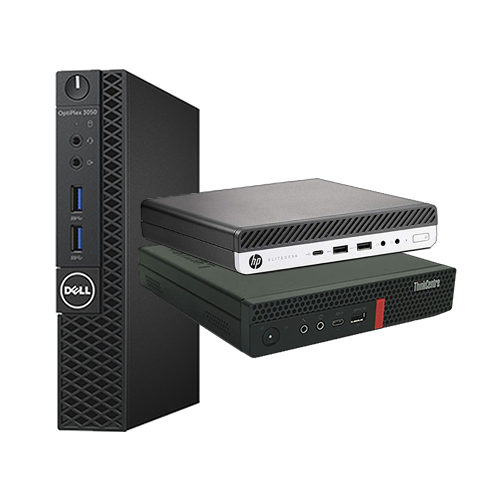
Many people with setups similar to ours have been using mini-PCs as “microservers” for years or have modified them for specific purposes, such as firewalls (pfSense). Lenovo models are particularly popular, especially those with 8th-generation Intel CPUs and newer (Windows 11 compatibility!). Over the past few years, refurbished models have been available time and again in a wide variety of configurations and at equally varied prices.
Alternatively, there are models from Dell and HP. Fujitsu also offers similar small-form-factor PCs. You can only filter effectively if you consider what you’re willing to pay and what your requirements are. Ultimately, it will come down to a short-term, specific offer.
Requirements
Generally speaking, there are now models available with AMD processors, in addition to those with Intel CPUs. Depending on your intended use, you can rule out one or the other right from the start:
Do you need to transcode, for example for Immich, Kodi, Plex or Jellyfin?
Then anything with an AMD CPU or APU is out of the question. Why? The integrated graphics unit is of lower quality compared to that in Intel processors and underperforms when encoding video material (in parallel). It’s stronger for gaming, but that doesn’t really help in a server. As an emulation PC or for desktop use with Linux, the AMD models would then be the better candidates again.
In our case, we want to run Proxmox, as usual using the integrated Intel GPU for transcoding. So it has to be a model with an Intel CPU. An 11th-generation Intel processor or newer would be ideal, since the iGPU has been significantly more powerful since then. Unfortunately, these are rarely available at a good price. Starting with the 12th generation, there’s the added issue that only a few models still use DDR4, with most relying instead on the very expensive DDR5.
Decision?
At the time I was comparing options, the only deals that caught my eye were those featuring 8th, 9th, and 10th generation Core processors. After creating a table listing all the DDR4 SO-DIMM RAM modules I owned, I knew what the conclusion would be:
Two mini-PCs, reasonably affordable, with a sensible amount of RAM. Plus at least two M.2 slots in the 2280 form factor with full bandwidth (4 lanes, PCIe 3.0) and the option to install a SATA storage drive.
That rules out the affordable and popular M720q or M920q from Lenovo: they only have one M.2 slot. If you want both, you have to go for the rarer and more expensive “M920x” variant, for example. To be honest, I also simply prefer the design of the Dell and HP models – simple in grayscale. After comparing prices and spec sheets, I ended up with two…
…HP EliteDesk 800 G6 DM!
First, because I really like these devices in terms of both expandability and design and second, because I was able to buy them with the following features for just under €300 each:
| Component | Installed |
|---|---|
| Processor | Intel Core i5-10500T 6 Cores, 12 Threads Base clock 2.30 GHz Socketed (FC-LGA 1200) 35 Watts TDP |
| RAM | 16 GB DDR4-3200 @ 2666 MHz SO-DIMM, Just one bar installed (the most important thing right now – perfect for “topping off”!) A maximum of 2 x 32 GB at 2666 MHz is possible |
| Boot device | 256 GB WD SN530 (PCIe 3.0 x4, NVMe) Second M.2 slot is empty No SATA caddy is present |
| Miscellaneous | Condition: Very good Wi-Fi and Bluetooth are built-in (Intel AX201—I didn’t need it) Both units have the “HDMI” module installed in the primary Flex-IO v2 slot One of them had the “Serial RS232” module installed in the secondary Flex-IO v2 slot |
Unfortunately, this isn’t my ideal configuration for this model series: I would have preferred versions with significantly more powerful 65-watt TDP processors, which also feature a much better cooling solution. In a market with these prices, you can’t always get exactly what you want – it’s always going to be a compromise.
By choosing these 35-watt TDP models, future upgrades are limited to “T” CPUs, which are harder to find and generally more expensive than their 65-watt counterparts. The top-of-the-line “Intel Core i9-10900T,” a powerful ten-core processor with Hyper-Threading, for example, is almost impossible to find. The “i9-10900” model without the “T,” on the other hand, which is often built into OEM gaming PCs, is actually quite common and fairly affordable; many have likely upgraded to the i9-10900K or even to an 11th-generation CPU.
At the same time, the power supply on the motherboard of the 35-watt models and the included power adapter are not capable of powering more powerful processors (not all components on the pcb were populated). For me, the configuration I purchased was a good fit mainly because the price was right and the power consumption will naturally be very low. In addition, the performance of the iGPU and the single-core boost is roughly comparable to the existing i5-10210U, which was the goal. More is always better, but not in continuous operation if that also means significantly higher power consumption and heat.